Android Sideloading Gets a 24-Hour Lock: What the New Rules Mean for Malaysian Users

TLDR
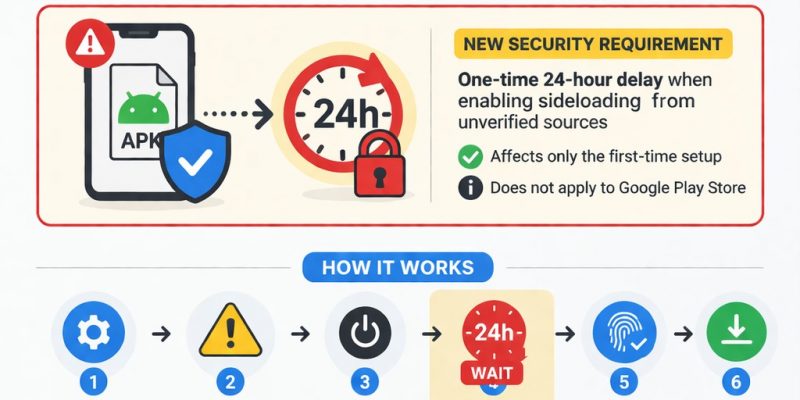
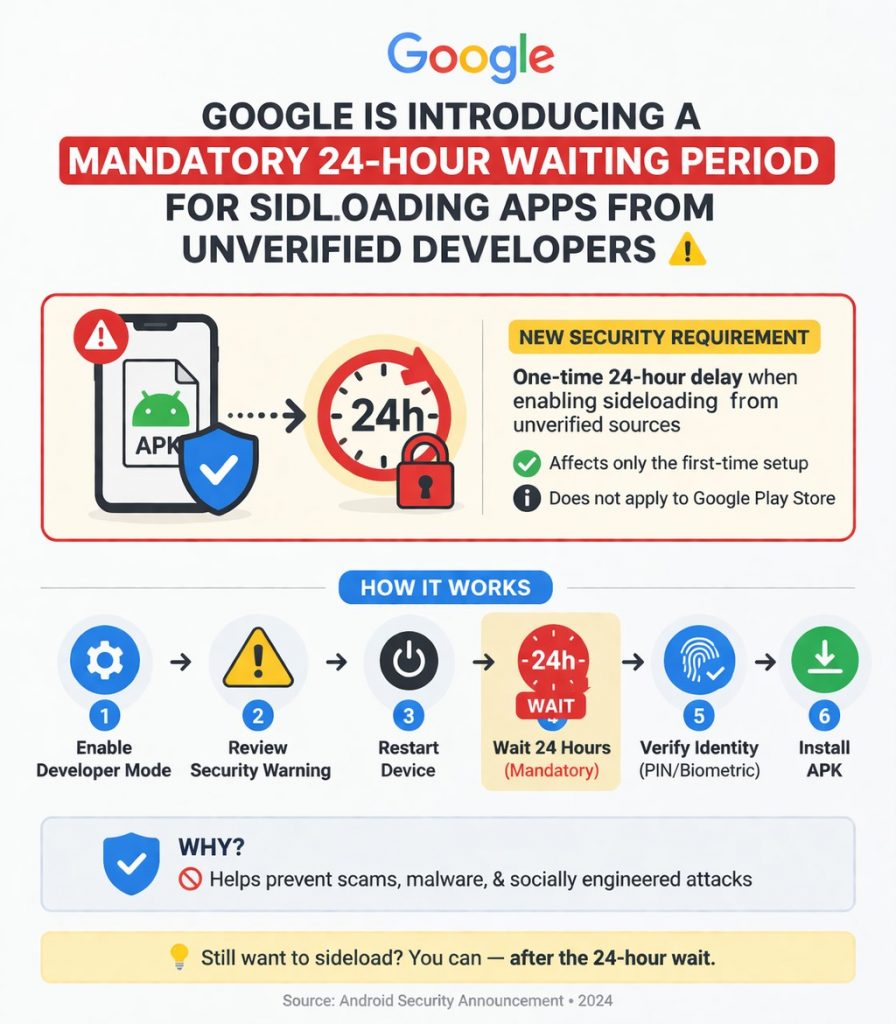
- Google is introducing a mandatory 24-hour waiting period before you can sideload apps from unverified developers
- The new process requires six steps: enable Developer Mode, confirm no coercion, restart, wait 24 hours, re-authenticate, then install
- The changes target scam apps that exploit urgency and social engineering — not legitimate power users
- Malaysian APK downloaders who rely on regional app availability will feel the impact significantly
- Sideloading from verified developers remains unchanged — Google Play Store apps are not affected
Android’s New Sideloading Reality Is Here
Google is finally pulling the curtain back on exactly how Android’s revamped sideloading process will work — and if you regularly install apps outside the Google Play Store, you are going to notice it immediately. The company has confirmed a new multi-step flow for apps from unverified developers that includes, among other things, a mandatory 24-hour waiting period before you can actually install anything.

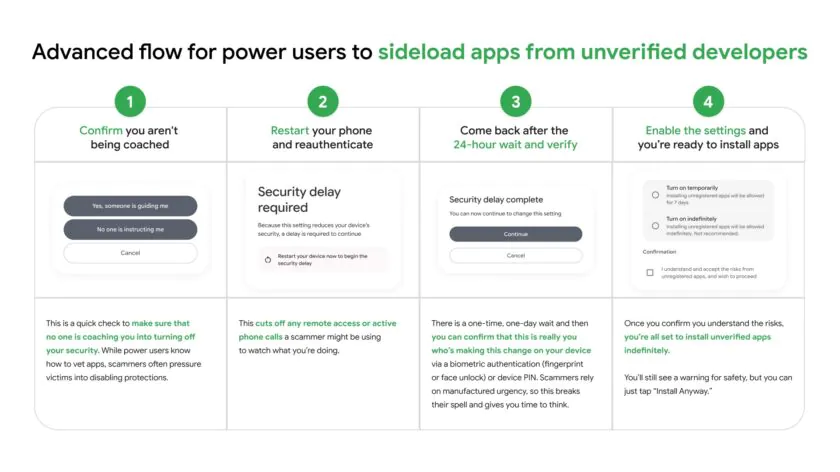
This isn’t a gentle nudge or another warning screen you can quickly dismiss. Google’s new “advanced flow” for sideloading is a deliberately slow process designed to break the cycle of social engineering scams that have plagued Android users for years. For Malaysian power users who have long enjoyed the freedom of installing APKs from third-party sources, this represents a meaningful shift in how open Android truly is.
The Six-Step Sideloading Process Explained
Here is exactly what Malaysian Android users will need to go through when installing an app from an unverified developer:
Step 1: Enable Developer Mode
This isn’t new — Developer Options has been on Android for years. But it adds an intentional layer of friction. You can no longer sideload apps without deliberately navigating to enable Developer Mode first, signaling that you know what you’re doing.
Step 2: Confirm You Are Not Being Coerced
Android will now explicitly ask whether someone is guiding you through the process or pressuring you to disable protections. This is a direct response to the common scam tactic where a fraudster stays on the phone with a victim, walking them through each step while instilling a false sense of urgency.
Step 3: Restart Your Phone
A mandatory restart cuts off any active calls, remote access sessions, or screen-sharing tools that a scammer might be using to monitor or control the device. This step alone breaks a huge part of how phone-based scams operate.
Step 4: Wait 24 Hours
Yes, a full 24 hours. Google calls this the “protective waiting period,” and it exists specifically to kill the manufactured urgency that scammers depend on. If a caller is telling you to act now because your bank account has been compromised or a family member is in trouble, having to wait a full day gives you time to cool off, think clearly, and potentially seek advice.
Step 5: Re-Authenticate with Biometrics or PIN
After the waiting period expires, you must confirm it is really you by re-authenticating with your fingerprint, face unlock, or device PIN. This prevents someone from walking away from an unlocked phone and having a scammer complete the installation.
Step 6: Finally Install the App
Only after completing all of the above can you actually install the app. Once sideloading is enabled, you can choose to allow installations for seven days or indefinitely. During that window, you can install as many APKs from as many different unverified developers as you like without repeating the process.
Why Google Is Doing This
Google’s reasoning is rooted in the evolving threat landscape of mobile security. Android has grown far beyond the enthusiast platform it once was — it is now the primary computing device for billions of people worldwide, including a significant portion of the Malaysian population. Scammers have adapted, using high-pressure phone calls, legal threats, and emotional manipulation to walk victims through disabling protections and installing malicious apps.
As Google President of the Android Ecosystem, Sameer Samat, explained in an interview: “You want a platform to be open, but you need a platform to be safe.” The tension between openness and security is at the heart of this change. Google’s research found that existing warnings and friction screens were insufficient in high-pressure scenarios — people ignored them because they were told to act immediately.
The 24-hour wait is deliberate in length. Google even acknowledged that it was calibrated to be annoying but not completely deal-breaking for legitimate power users. The goal is to make life difficult for scammers while preserving a path for users who genuinely need to install non-Play-Store apps.
What This Means for Malaysian APK Downloaders
Malaysia has a thriving culture of APK downloading, driven partly by regional app availability issues. Some apps and games are released in other markets before Malaysia, or are simply not available in the Google Play Store due to licensing restrictions. Malaysian Android users have historically relied on third-party APK sites to access these apps, and many also use regional app stores or direct downloads for apps not officially available locally.
Under the new rules, this workflow becomes significantly more cumbersome. Each time you want to install an app from a developer who has not undergone Google’s verification process, you will need to go through all six steps — including the full 24-hour wait. This is particularly disruptive for users who regularly download multiple APKs or who need to update sideloaded apps frequently.
That said, apps from verified developers — including most major apps on Google Play — will sideload without any of this additional friction. Google is also introducing a developer verification system that allows app makers to register with the company, which would remove the restrictions for their apps. If a developer you trust chooses to verify, you won’t notice any change at all.
Google also provides an exception for “limited distribution” apps — small hobbyist or student projects shared with up to 20 devices — which do not require full verification.
Our Take
Google’s new sideloading rules represent a genuine effort to protect vulnerable users from increasingly sophisticated scams — and the reasoning is sound. In Malaysia, phone-based scams are far from rare, and anything that forces a pause before installing a suspicious app is probably a net positive for the average user. The 24-hour wait is inconvenient, but it is hard to argue that it is disproportionate given the financial and emotional damage that scam victims suffer.
For Malaysian power users, though, the picture is more frustrating. The APK culture in Malaysia is alive and well, driven by regional content gaps and a tech-savvy population comfortable with sideloading. For these users, the new process adds genuine friction to workflows that previously worked smoothly. If a trusted developer you rely on doesn’t go through Google’s verification process, you will be stuck waiting 24 hours every time you install or update their app.
Our take: this change is probably necessary and mostly good for Android security in Malaysia. But it is a reminder that the era of truly open Android is fading. Google is gradually closing the gap between Android and iOS in terms of platform control — and for enthusiasts who valued Android’s openness, that is worth acknowledging, even if the security trade-offs make sense for the broader user base.
Keyword: Android sideloading 24-hour lock Malaysia