AirLLM Lets You Run 70B AI Models on a Single 4GB GPU — And It’s Changing Local AI Access

TLDR:

- AirLLM enables 70B parameter AI models to run on a single 4GB VRAM GPU without quantization
- Layer-wise model loading breaks the VRAM bottleneck that previously required datacenter hardware
- Now supports Llama3.1 405B on just 8GB VRAM
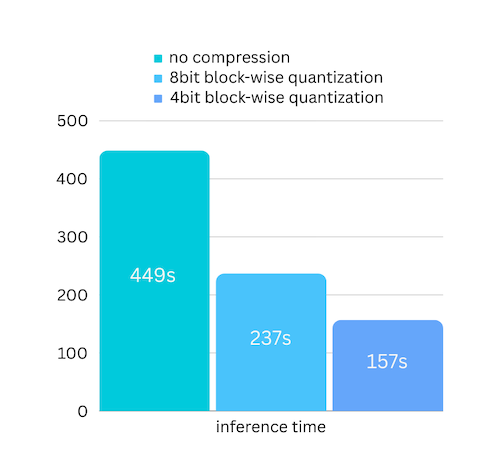
- 3x speed improvement with block-wise quantization compression
- Supports Llama2/3, ChatGLM, Qwen, Baichuan, Mistral, InternLM
- Can also run on MacOS (Apple Silicon) and CPU inference
The VRAM Wall, Broken
Running large AI models locally has always meant choosing between quality and hardware. A 70 billion parameter model like Llama2-70B requires roughly 140GB of VRAM just to load — far beyond what any consumer GPU can handle. The standard workaround has been quantization: reducing model precision to fit smaller VRAM, accepting accuracy loss in exchange for accessibility.
AirLLM takes a fundamentally different approach. Instead of compressing the model, it changes how models load. By decomposing the model into individual layers and streaming them during inference, AirLLM eliminates the need to hold the entire model in VRAM simultaneously. The bottleneck was never compute — it was the disk-to-VRAM transfer speed. AirLLM exploits this with layer-wise loading that keeps only the active layer in memory.
The result is staggering: a 70B model runs on 4GB of VRAM. No quantization. No distillation. No pruning. Just architecture that matches how inference actually works.
How Layer-Wise Loading Works
Traditional model loading copies the entire model into VRAM before inference begins. For a 70B model, that means 140GB+ of data must transfer from disk to memory before anything happens. Modern consumer GPUs max out at 24GB VRAM, making this approach impossible without compression.
AirLLM decomposes the model into individual transformer layers. During inference, only one layer lives in VRAM at a time. The system loads each layer, performs its computation, then loads the next. This trades disk bandwidth for VRAM efficiency — and disk bandwidth has grown faster than VRAM capacity.
The practical implication: if you have a 4GB VRAM GPU and 200GB of disk space, you can run models that previously required a server rack. The compression happens at the architectural level, not the numeric level.
Block-Wise Quantization for 3x Speed
AirLLM v2.0 added block-wise quantization compression that delivers up to 3x inference speed improvement with negligible accuracy loss. Unlike standard quantization that compresses both weights and activations, AirLLM only quantizes weights — the bottleneck is loading speed, not compute.
By targeting only weights, AirLLM avoids the accuracy degradation that plagues aggressive quantization approaches. Block-wise quantization processes data in chunks rather than individual values, maintaining model coherence while dramatically reducing loading overhead.
Supported Models
AirLLM has expanded to cover the most capable open-source models:
- Llama2/3 — Including Llama3.1 405B (requires 8GB VRAM)
- ChatGLM — THUDM’s conversational model
- Qwen — Alibaba’s open-source series
- Baichuan — 7B and 13B variants
- Mistral — The highly capable 7B model
- InternLM — Shanghai AI Lab’s offerings
The library uses an AutoModel class that automatically detects model type, eliminating the need to specify model classes manually. Simply pass the Hugging Face repository ID, and AirLLM handles the rest.
Running on MacOS and CPU
AirLLM v2.10 extended support beyond NVIDIA GPUs. MacOS with Apple Silicon can run 70B models through MLX optimization. CPU inference is also supported for systems without capable GPUs — though inference speed will be significantly slower.
For developers working on machines without dedicated GPUs, this means AirLLM models can run on a MacBook Pro or any modern laptop, albeit at reduced speeds. The accessibility angle matters: not everyone has access to NVIDIA hardware, and AirLLM broadens who can experiment with large models.
Practical Setup
AirLLM installs via pip and integrates with existing Hugging Face workflows:
from airllm import AutoModel
model = AutoModel.from_pretrained("garage-bAInd/Platypus2-70B-instruct")
# With compression for 3x speed
model = AutoModel.from_pretrained("garage-bAInd/Platypus2-70B-instruct", compression='4bit')
The API mirrors standard Hugging Face transformer patterns, making adoption straightforward for developers already familiar with model loading. The main requirement is sufficient disk space — the layer decomposition process requires more storage than the original model.
What This Means for Local AI
AirLLM represents a shift in what’s possible for individual developers and small organisations. Previously, running a capable 70B model required either cloud API access (ongoing costs, privacy considerations) or expensive hardware configurations (A100 GPUs, multi-GPU setups).
Now, a GPU that costs a few hundred Ringgit can run models that rival cloud API quality. For Malaysian developers and businesses, this changes the economics of AI integration. Local deployment means no per-token costs, no internet dependency, and complete data privacy — conversations never leave the local machine.
The 405B Llama3.1 support is the extreme end of this spectrum — 405 billion parameters on 8GB VRAM. For context, that model previously required a cluster of high-end GPUs. AirLLM’s layer-wise approach makes that accessibility democratic.
Our Take
AirLLM is a clever piece of engineering that solves a real problem. The layer-wise loading approach exploits the actual bottleneck in LLM inference rather than papering over it with compression compromises. The result is a system that makes massive models accessible to hardware-constrained users without sacrificing quality.
For Malaysian developers, researchers, and businesses considering local AI deployment, AirLLM changes the cost-benefit calculation. A mid-range GPU plus AirLLM can replace cloud API usage for many applications, eliminating per-token costs and latency from network round-trips.
The 3x compression speed improvement in v2.0 makes local inference genuinely practical for real-time applications. Combined with MacOS support and CPU fallback, AirLLM is one of the more interesting developments in the open-source AI space for users without access to datacenter hardware.
The question for potential users isn’t whether the technology works — it clearly does. It’s whether the workflow complexity of local deployment outweighs the benefits of cloud API simplicity. For privacy-sensitive applications or high-volume usage, AirLLM makes local deployment the obvious choice.
Keyword: AirLLM local AI 70B model 4GB GPU layer-wise loading
Source: