iOS 26.4 Enables 5G Standalone on Malaysian iPhones — Maxis, U Mobile, Yes 5G Now Supported

TLDR:
- iOS 26.4 quietly enables 5G Standalone (SA) mode on compatible iPhone models in Malaysia
- 5G SA support now active on Yes 5G, U Mobile, and Maxis networks
- True 5G connectivity — no 4G LTE anchor required, lower latency and better performance in crowded areas
- All iPhone models that support 5G are compatible, including iPhone 12 series and newer
iOS 26.4 Quietly Unlocks Full 5G Experience for Malaysian iPhone Users
Malaysian iPhone users woke up to a significant network upgrade with the arrival of iOS 26.4. While Apple release notes focused on security patches and bug fixes, buried in the technical details was a change that matters greatly for 5G connectivity in Malaysia — the update enables 5G Standalone (SA) mode on compatible iPhone models running on supported Malaysian networks. This is not a cosmetic change. 5G SA represents a genuine step up from the Non-Standalone (NSA) mode that has been the default for 5G connections in Malaysia since the network launched.

The practical impact for users is measurable. 5G SA means the iPhone connects directly to the 5G network without using 4G LTE as a fallback anchor. In areas with high network traffic — think KLCC during rush hour, or your local mall on a weekend — this separation from LTE infrastructure translates to more consistent speeds and noticeably lower latency. For mobile gaming, video calls, and any app that relies on real-time data, the difference can be felt in everyday use.
How 5G Standalone Differs from Non-Standalone
To understand why this matters, it helps to know how most 5G networks in Malaysia have been operating. The initial rollout of 5G in Malaysia used Non-Standalone architecture, where 5G radio access sits on top of an existing 4G LTE core network. The LTE part handles tasks like authentication and voice calls, while 5G handles data when conditions allow. This hybrid approach allowed faster initial deployment but meant 5G performance was still constrained by the underlying LTE infrastructure.
Standalone 5G dispenses with LTE entirely for connected devices. The 5G network handles everything independently — authentication, data, voice — using a dedicated 5G core network built specifically for next-generation connectivity. The result is lower latency (the time it takes for data to travel from your phone to the network and back), better spectral efficiency (more data per frequency), and improved performance in crowded environments where many devices connect simultaneously.
Which Malaysian Networks Support 5G SA on iPhone
Three Malaysian carriers have confirmed 5G SA compatibility with iOS 26.4 on supported iPhone models. Yes 5G, which has been aggressive in its 5G expansion since launching, leads the pack with the most comprehensive 5G SA coverage in its network rollout areas. U Mobile has also activated 5G SA support for its users, and Maxis — traditionally more conservative with network announcements — has confirmed 5G SA functionality on its network as well.
For users on other networks, the situation varies. DNB single wholesale network arrangements mean 5G availability is still tied to individual carrier agreements and device compatibility. If your carrier has not yet enabled 5G SA on its network, your iPhone will continue to connect via 5G NSA where 5G signal is available, which still offers improvement over LTE but falls short of the full SA experience.
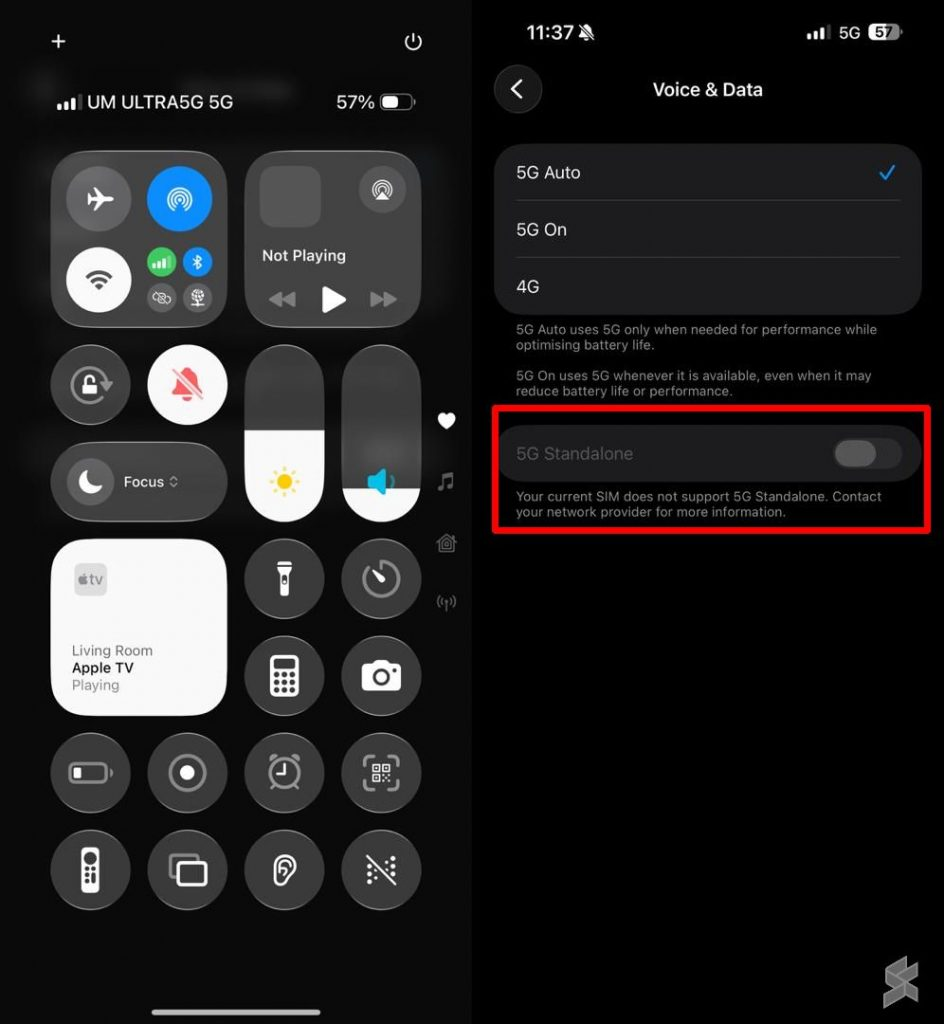
To check if your iPhone is connected to 5G SA, you can go to Settings > Cellular > Cellular Data Options > Voice & Data. If 5G Auto or 5G On is selected and you are in an SA-covered area, your iPhone should automatically latch onto the standalone network. Network indicator will show 5G as before — there is no distinct icon for SA mode in iOS.
Our Take
While this will not generate the same excitement as a new camera feature or emoji update, iOS 26.4 enabling 5G SA on Malaysian iPhones is one of the more practically significant network improvements for Malaysian smartphone users in recent months. Malaysia 5G network has had coverage that often outperformed 4G in terms of raw speed when you could get it — but consistency was the problem. 5G SA directly addresses that by building a proper 5G infrastructure rather than bolting 5G radios onto an LTE core.
The practical benefit will not be universal immediately. 5G SA performance depends entirely on whether your carrier has upgraded its network infrastructure in your area. Urban users in Kuala Lumpur, Petaling Jaya, and other major cities are most likely to see the benefits first. Suburban and rural areas will still be on LTE or 5G NSA for the foreseeable future.
That said, if you are a Maxis, Yes 5G, or U Mobile user with a modern iPhone, it is worth updating to iOS 26.4 now if you have not already. The feature is passive — you do not need to configure anything. Once updated, your iPhone will automatically connect to 5G SA where available, and you will benefit from lower latency and better performance without lifting a finger. Sometimes the best technology updates are the ones you do not have to think about.
Keyword: iOS 26.4 5G Malaysia