ASUS TUF Gaming F16 (2025) ft. RTX 5060 Review — nailing the sweet spot

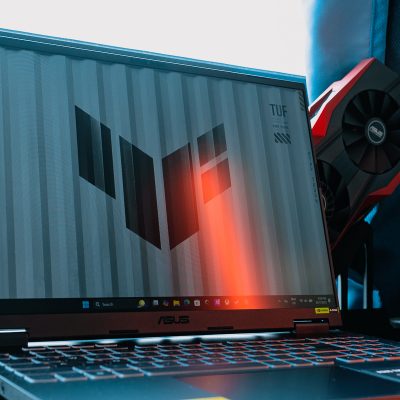
2025 ASUS TUF Gaming F16 (FX608JM)
The ASUS TUF Gaming F16 (FX608JMR) is a gaming laptop that appeals to me. It's relatively affordable at RM6,499, and is overall a pretty solid laptop, pun not intended.
What's Good?
- Sleek utilitarian design
- Upgradeability is a nice perk
- Still a potent contender
- Games well, but needs upscaling and frame gen
- A decent display for its price
- All the ports you need, with a weird quirk
What's Not?
- Ageing processor limits battery life
- Fans spool up really loudly
- Lackluster speakers
Unlike last year’s TUF Gaming A14 (FA401) which came with the AMD Ryzen AI 9 HX 370, today’s ASUS TUF Gaming F16 (FX608JMR) features a more…mature processor. We have an Intel Core i7-14650HX mated to the latest NVIDIA GeForce RTX 5060 Laptop GPU, promising some serious gaming horsepower. After all, your framerate in most games is likely limited by the GPU rather than CPU, and I am pretty sure that’s what ASUS is banking on here. Does this pairing of old CPU with new GPU work, or will it make this laptop a dud? Well, let’s find out.
ASUS TUF Gaming F16 — What’s Good?
Sleek utilitarian design
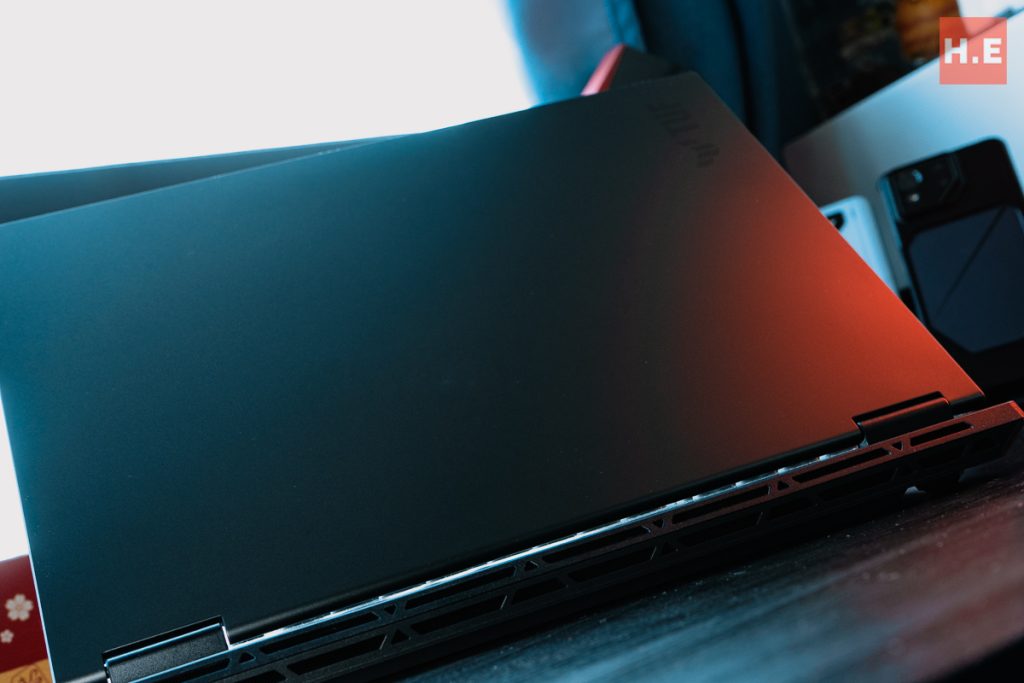
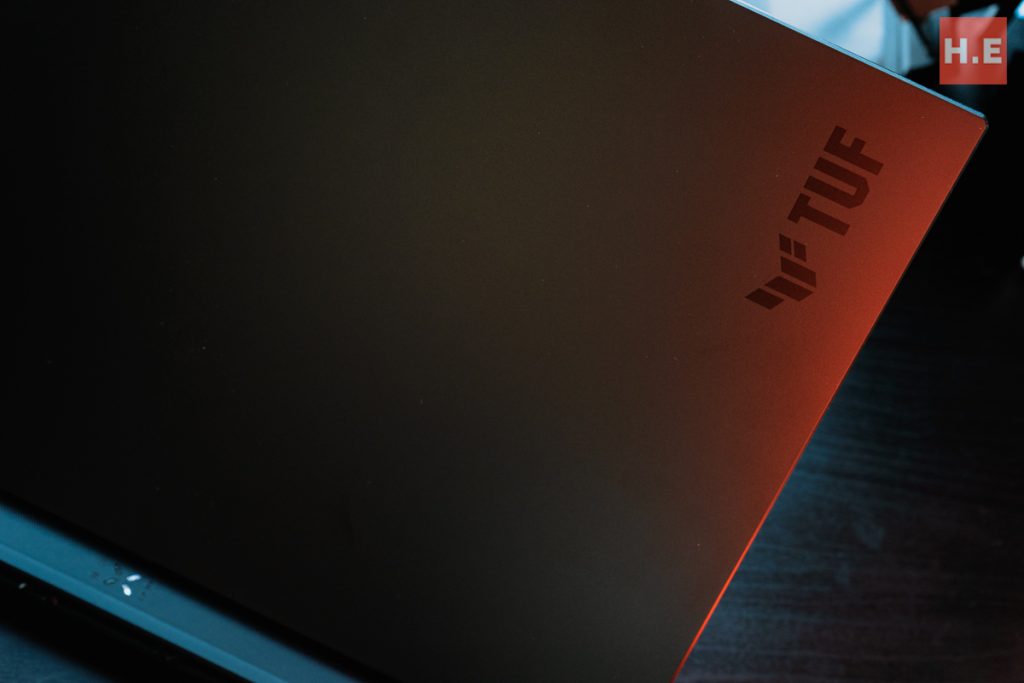
In terms of looks, the TUF Gaming F16 is almost an exact twin of the TUF Gaming A14. albeit scaled up to fit the larger 16-inch screen — in case the name wasn’t obvious enough. There are some subtle differences, like the full-width rear vents which also comes with a longer protrusion out the back. We get a nice, clean sandblasted aluminum lid finished in Jaeger Gray, while an appreciably minimalist TUF Gaming emblem is lasered into the upper right corner of the lid. Overall, the design of the TUF Gaming F16 is pretty subtle, with only the vents that span the entire rear end giving away the fact that this is a gaming laptop.
Upgradeability is a nice perk
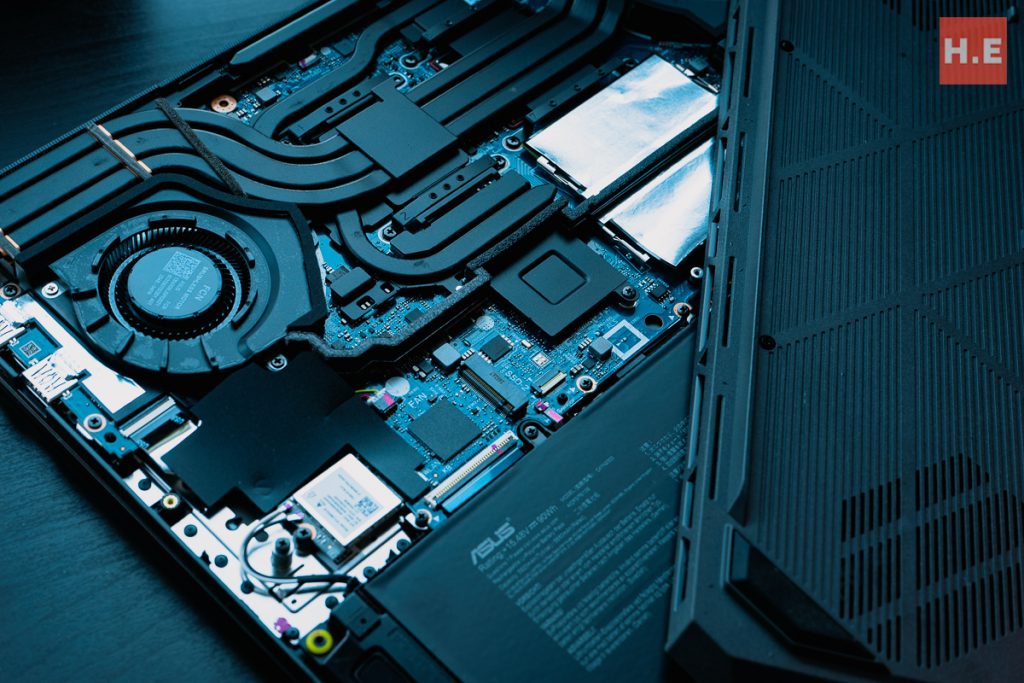
Before we get to the performance, I would also like to touch on the upgradeability. In recent years, gaming laptops have been pursuing increasingly thin designs which leaves out any upgrade paths. SO-DIMM slots are replaced by non-upgradeable soldered RAM, and SSD slots are cut away to make room for larger coolers or batteries. But that’s not the case with our TUF Gaming F16 here. While it’s still relatively portable, being just 17.9mm at its thinnest point while tipping the scales at 2.2kg, it still gets the full complement of dual M.2 PCIe 4.0 slots and DDR5 SO-DIMM slots. So, with that out of the way, let’s see the gaming performance.
Still a potent contender
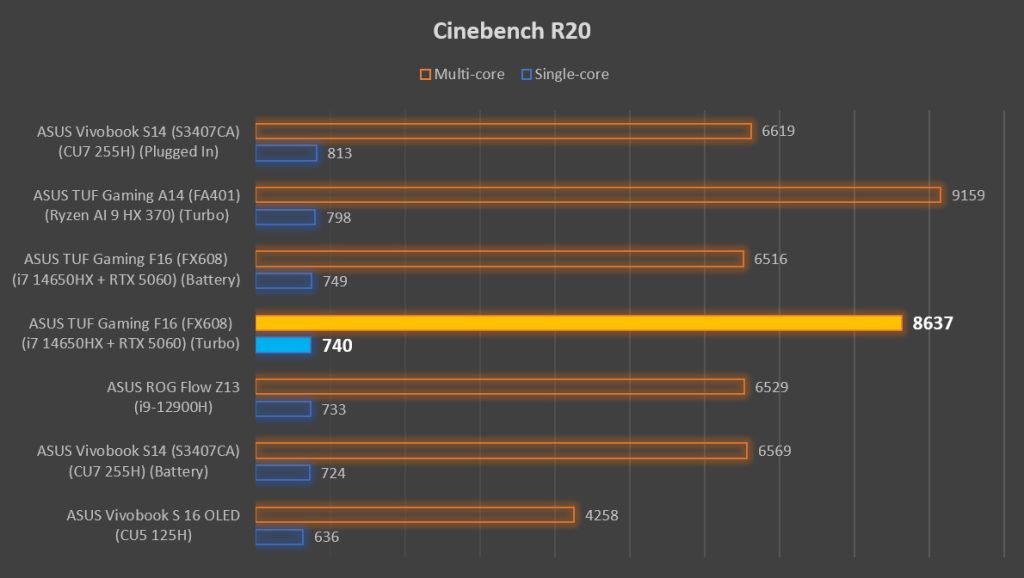
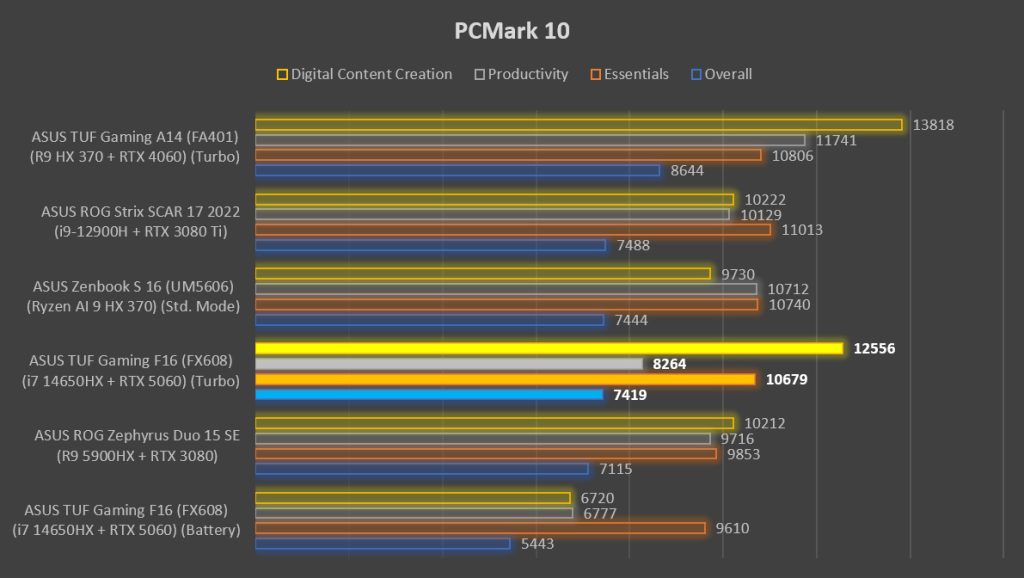
The outdated 14th Gen Intel Core 14650HX does pretty well in Cinebench, although we can quickly see that when unplugged, the performance falls drastically. We see a similar theme in PCMark 10 as well, with scores falling anywhere between 20-30% when not getting fed power from the wall. If you want the TUF Gaming F16 to deliver any serious performance, it will definitely have to be plugged in.
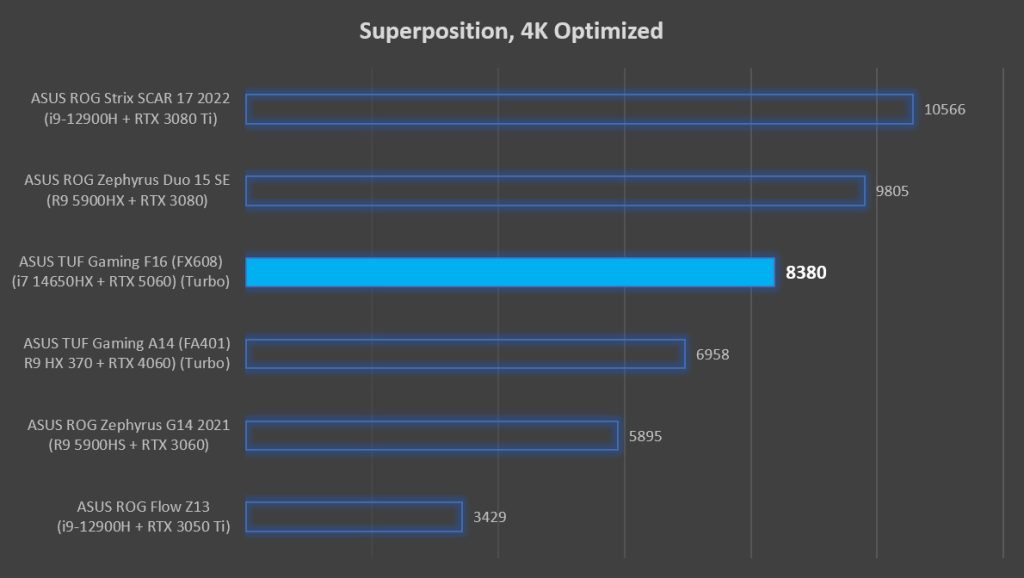
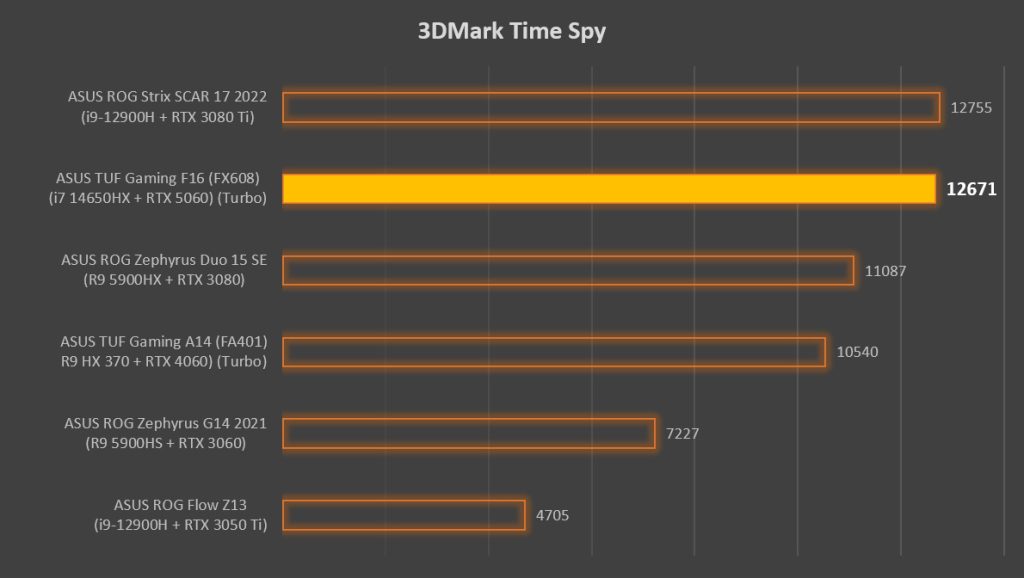
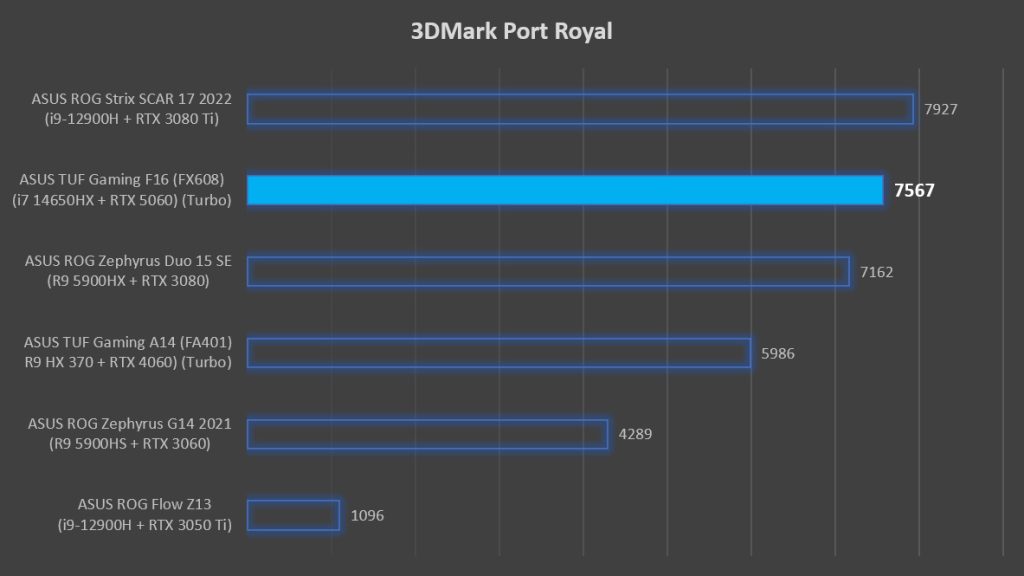
On the other hand, the GeForce RTX 5060 Laptop GPU is a strong performer. It’s quite interesting to see how a lower-mid-range GPU can match a flagship GPU from a couple of years back. But of course, it must be said that the GeForce RTX 3080 and GeForce RTX 3080 Ti are still very powerful GPUs in their own right, as can be seen in Superposition (4K Optimized) benchmark.
Games well, but needs upscaling and frame gen
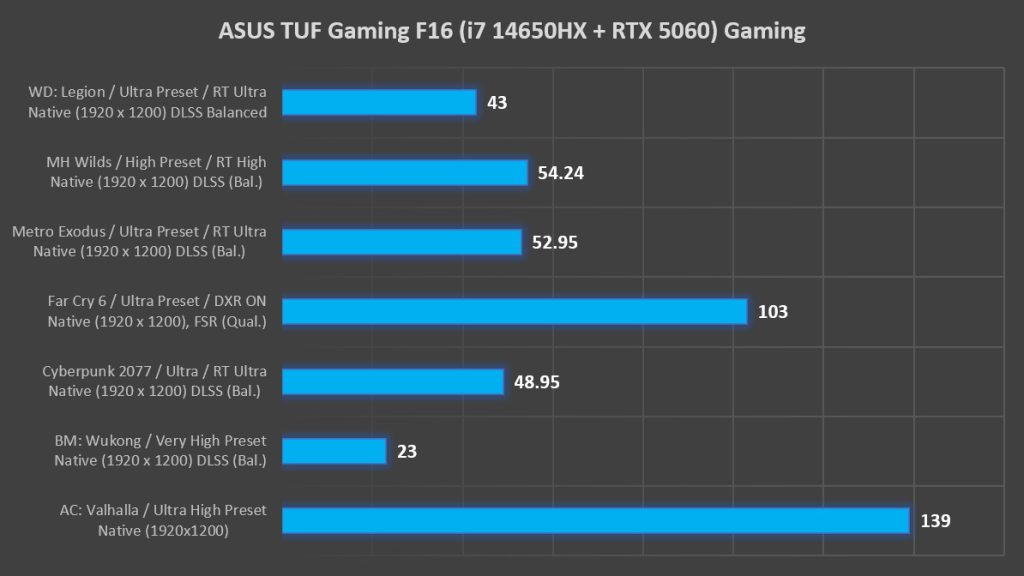
When it comes to gaming, the frame rates we’re getting are pretty playable. It helps that the native resolution of this laptop is FHD+, which is where the GeForce RTX 5060 Laptop GPU can really shine. Wit that said, a higher resolution would have given DLSS 4 and MFG 4x more opportunity to shine, as DLSS upscaling at 1200p leaves much to be desired in terms of visual fidelity. Still, 1200p is what I would consider the Goldilocks resolution to be paired with the GeForce RTX 5060 Laptop GPU, especially in games that don’t support DLSS. Just as a nitpick, I would say that there’s still gaming performance left on the table as we’re currently running with only a single stick of RAM.
A decent display for its price
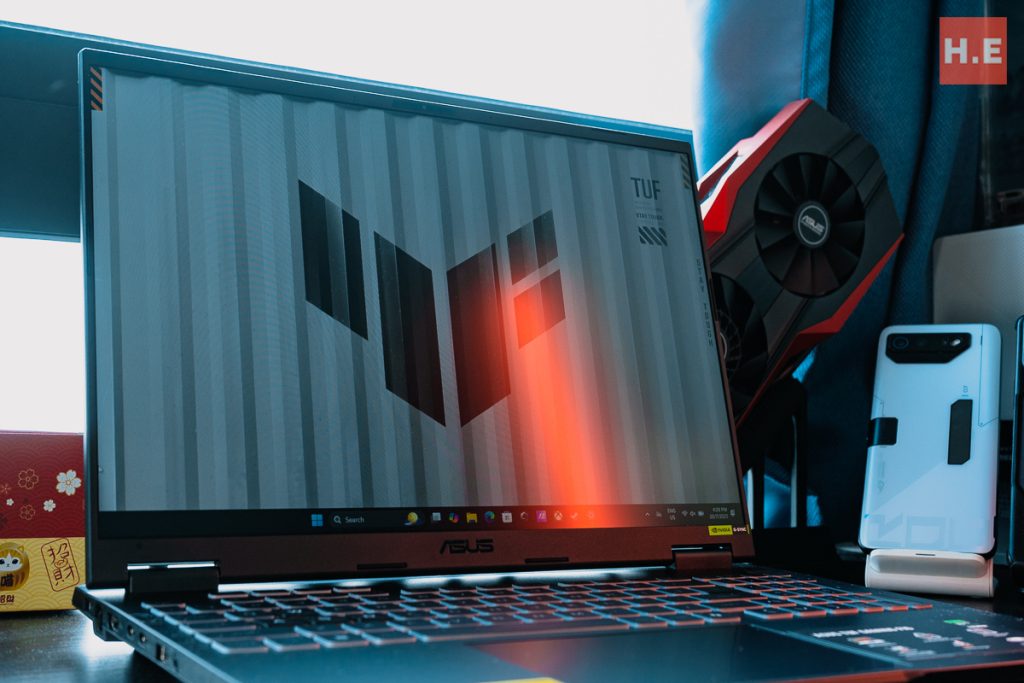
Similar to its smaller sibling, we have a pretty good display here. ASUS equipped the TUF Gaming F16 with a 165Hz IPS panel, capable of displaying 100% sRGB. This makes it a passable content creator laptop, which in turn means that it’s suitable as an all-rounder laptop to get for university. More on that later. The fast refresh rate is also paired up with NVIDIA G-SYNC, which eliminates tearing, while NVIDIA Advanced Optimus allows the GeForce RTX 5060 Laptop GPU to be directly connected to the display for maximum performance and minimum latency in games, bypassing the integrated graphics. And to top it all off, this screen can lay flat to 180-degrees, something which most gaming laptops fail to do. Big kudos to ASUS for this.
All the ports you need, with a weird quirk
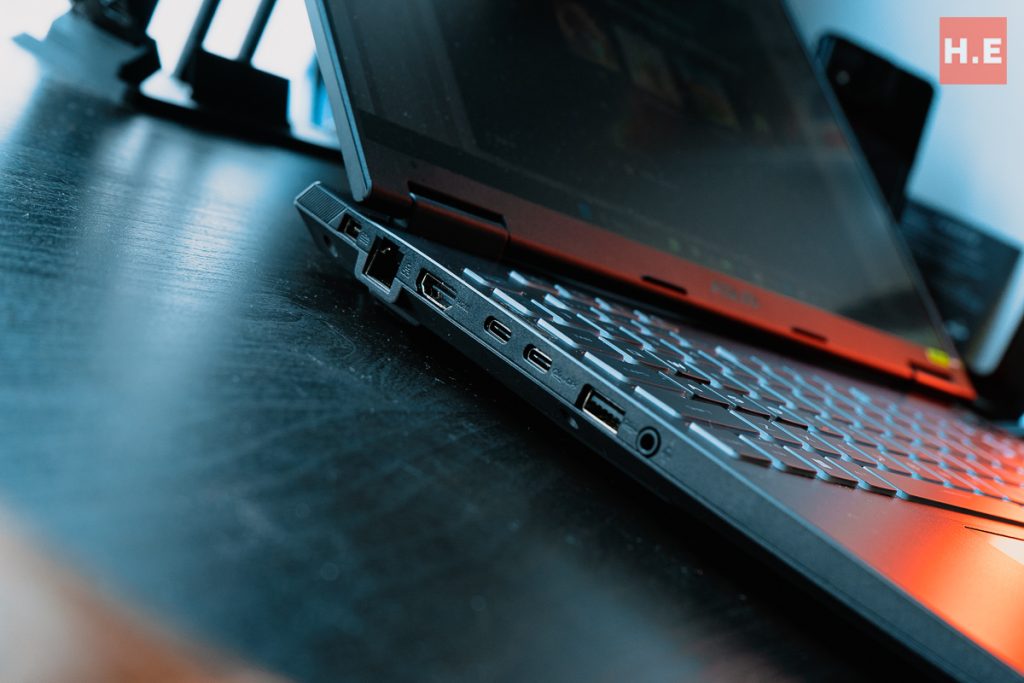
There’re two USB-C ports, one supporting 10Gbps USB 3.2 Gen 2 and one that supports Thunderbolt 4, HDMI 2.1 (FRL), and even a full-sized GbE LAN port. We have a total of three USB-A ports, all capable of 10Gbps. The TUF Gaming F16 delivers in terms of connectivity, with a WiFi 6E card rounding up on the wireless end as well. Now, onto the quirk. For some reason, only the USB-C 3.2 Gen 2 port supports USB-PD charging. The Thunderbolt 4 port doesn’t get support for it. I thought that the TUF Gaming A14’s similar situation was due to the USB-C ports being on opposite sides, but here on the TUF Gaming F16 they’re on the same side! If there’s anyone from ASUS reading this review, please let me know why.
ASUS TUF Gaming F16 — What’s Not?
Ageing processor limits battery life
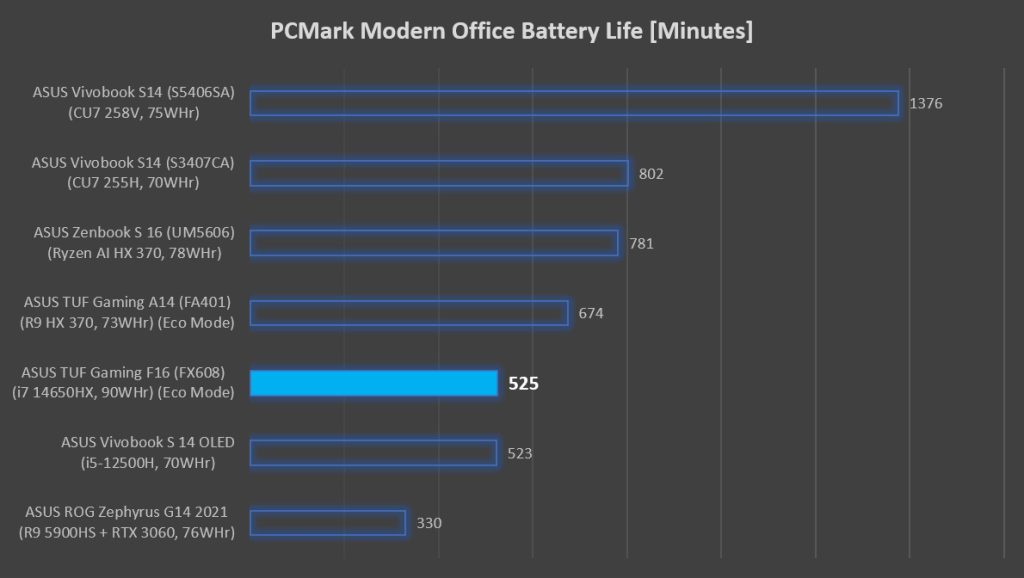
Even when the discrete NVIDIA GeForce RTX 5060 Laptop GPU is disabled, the TUF Gaming F16 struggles to deliver over 8 hours of battery life. Then there’s the lackluster performance when running on battery power. Even with the GPU out of the picture, you’re losing up to 30% performance simply by unplugging the laptop. If battery life is a major concern, I would pick some other laptop, but if you can deal with about 5 hours of juice before looking for a charger, this might just cut it. As a silver lining, there’s support for up to 100W USB-PD, so you can leave the bulky 280W power adapter at home for the gaming sessions.
Fans spool up really loudly
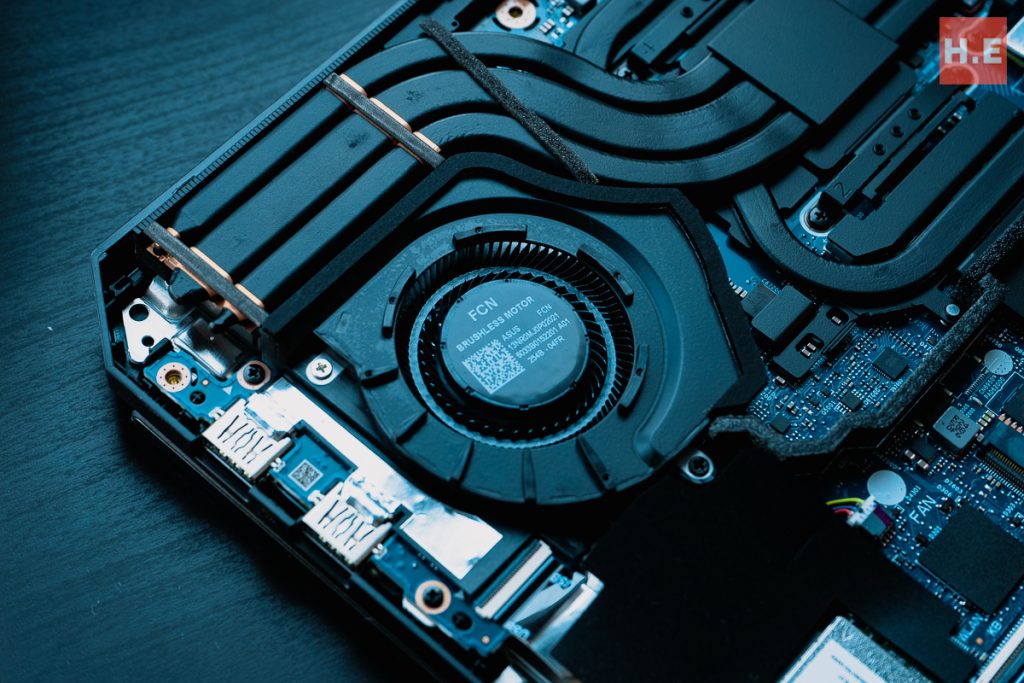
While I did appreciate the quiet whoosh of the TUF Gaming A14, the TUF Gaming F16 takes it to the next level. So much so that every time I started a game or benchmark on this laptop, my better half will ask me if it’s raining. With that said, in daily computing like puttering in Edge or the Office suite, the laptop will barely make any noise. But of course, when the load increases, the 2nd Gen Arc Flow fans can really spool up to meet the challenge. On average, the Core i7-14650HX maintains average temperatures of around 76°C, while the GPU is even cooler at 70°C on average. I will also note that the TUF Gaming F16 fan noise is of a rather pleasant tone, instead of some of the whinier laptops I have tested in the past.
Lackluster speakers
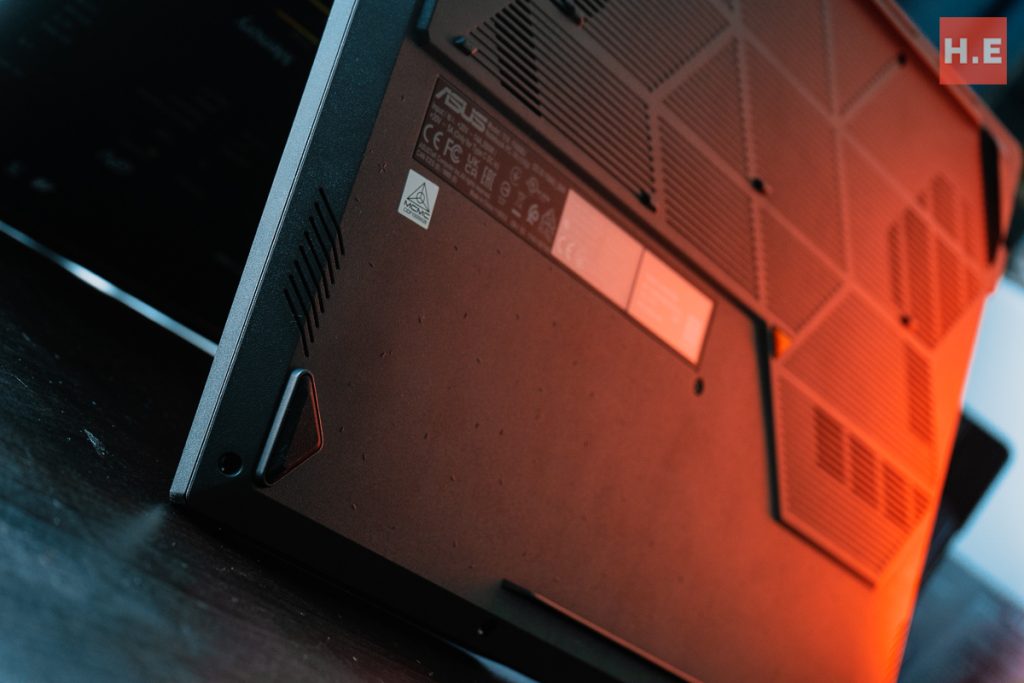
The speakers on the ASUS TUF Gaming F16… are serviceable. They aren’t quite capable to deliver the full impact of Thunderstruck by AC/DC. Movies and music are almost entirely devoid of the lower frequencies, with a muddy representation of the mid-bass. I wouldn’t put it past myself to watch a documentary or maybe a comedy with these speakers, but if I am going to watch anything with more action, I will probably hook it up to some headphones or speakers.
ASUS TUF Gaming F16 (FX608JMR) Specifications
| Processor | Intel Core i7-14650HX, 16C/24T (8P+8E) @ up to 5.2GHz 30MB L3 cache 55W TDP Intel 7 |
| Memory | 16GB DDR5-5600 SO-DIMM, dual-channel 1x DDR5 SO-DIMM slot vacant |
| Graphics | Intel UHD Graphics, 16 EU @ up to 1.6GHz NVIDIA GeForce RTX 5060 Laptop GPU, 100W TGP (up to 115W with Dynamic Boost) NVIDIA Advanced Optimus |
| Storage | 1TB WD PC SN560 SSD (M.2 PCIe 4.0 x4 NVMe SSD, NVMe 1.4) 1 x M.2 slots vacant |
| Display | 16-inch FHD+ 16:10 (1920 x 1200) 165Hz/3ms AUO B160UAN07.K IPS display 48~165Hz variable refresh rate, NVIDIA G-SYNC 300 nits max brightness, 100% sRGB gamut 90% screen-to-body ratio |
| Connectivity | WiFi 6E + Bluetooth 5.3 (Realtek 8852CE) 1 x GbE LAN (Realtek RTL8168) 1 x USB-C (Thunderbolt 4, 40Gbps) with display-out, G-SYNC 1 x USB-C (USB 3.2 Gen 2, 10Gbps) with display-out, USB-PD 3 x USB-A (USB 3.2 Gen 2, 10Gbps) 1 x HDMI 2.1 (FRL) 1 x 3.5mm combo jack |
| Audio | Stereo speaker system Dolby Atmos Built-in array microphone Two-way AI Noise Canceling |
| Power | 90WHr, 4-cell Li-ion battery 280W adapter, rectangle connector 100W USB-PD |
| Dimensions | 354 x 269 x 17.9 cm |
| Weight | 2.20kg |
| Included Accessories | TUF Backpack 3-month Xbox Game Pass |
ASUS TUF Gaming F16 (FX608JMR) Specs
ASUS TUF Gaming F16 — should you buy this?
The ASUS TUF Gaming F16 (FX608JMR) is a gaming laptop that appeals to me. It’s relatively affordable at RM6,499, and is overall a pretty solid laptop, pun not intended. I like the FHD+ screen, as I feel this is just the right resolution for the GeForce RTX 5060 Laptop GPU. I also like the full-sized keyboard, which is comfortable to type on, and the huge trackpad south of it is also very nice to use. Gone are the days when gaming laptops must be used with dedicated mice for basic navigation. 2.2kg isn’t too heavy to be carried around daily as well, so I feel that this is quite a well-balanced package overall.
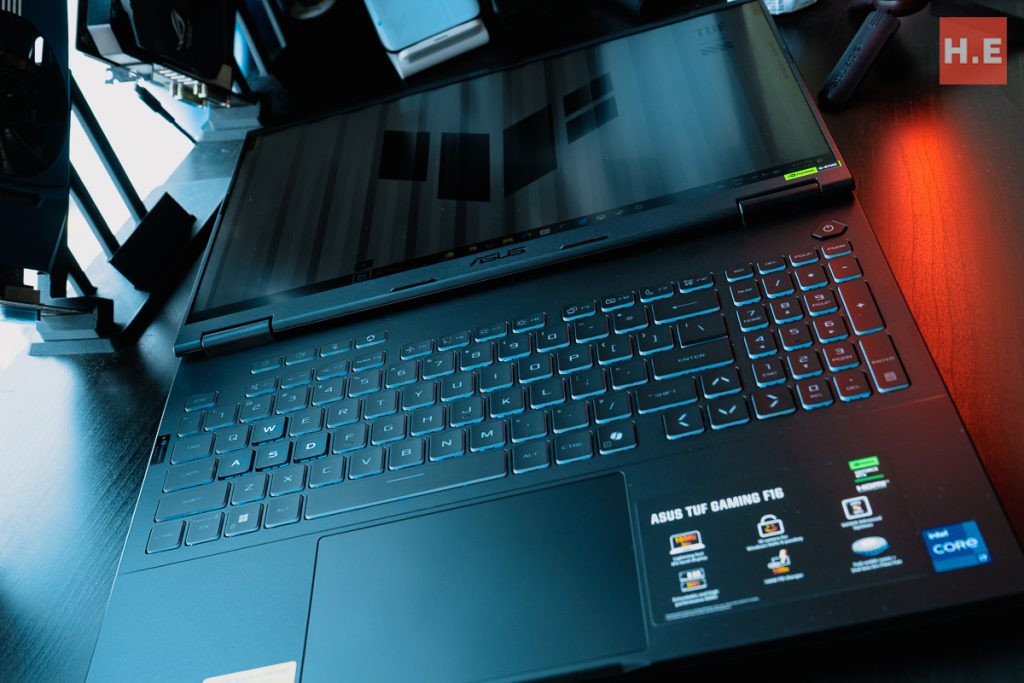
The minimalist design looks great, and the fact that you can lay the display flat is something very rarely seen in gaming laptops. Honestly, the only thing I really wish was better are the speakers, and maybe ASUS Malaysia could have equipped this laptop with quad-channel RAM (2x SO-DIMM) out of the gate. The 14th Gen Intel Core HX processor, while being rather old, is still pretty capable. And when paired with a GPU like the GeForce RTX 5060 Laptop GPU, doesn’t end up being the limiting factor in most games anyway. Efficiency is somewhat of a weak point, but the large 90WHr battery and 100W USB-PD support somewhat makes up for it.
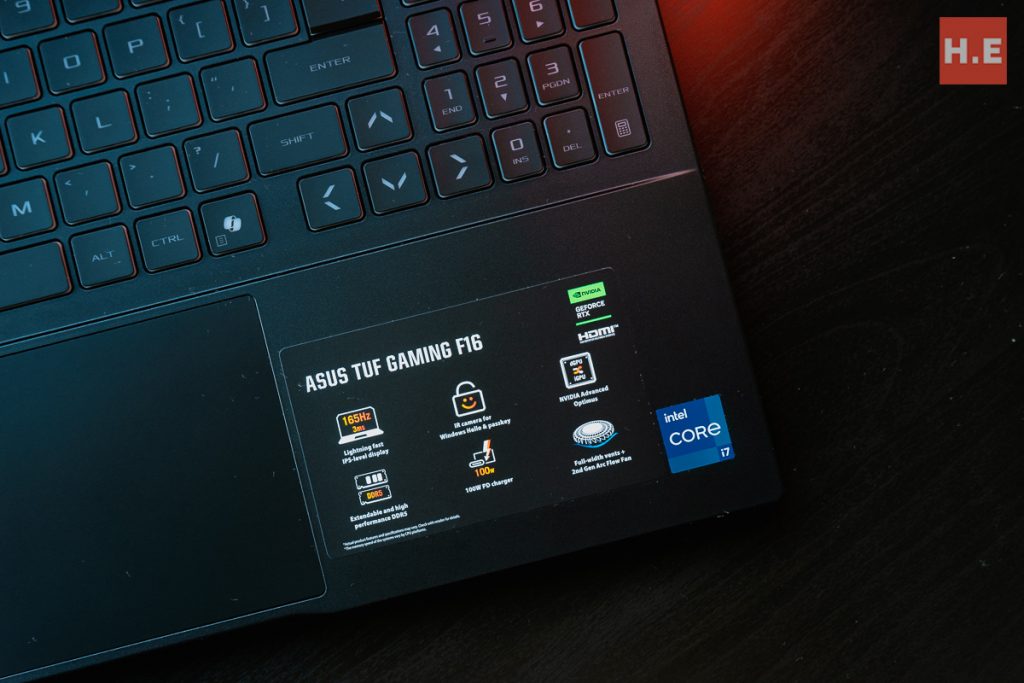
On that note, there’s an ASUS TUF Gaming F16 (FX608JM) with the Core i5-13450HX, if you are looking for something that should consume a bit less power and make a smaller dent on your wallet. At RM5,999, you get half the storage and the even older chip, but everything else is the same. If I had to make this choice when I was a student getting my first gaming laptop, I would probably pip up the extra RM500 for the little extra futureproofing offered by the beefier Core i7-14650HX. But now, in my 30s, after more than a decade of looking at consumer tech, we all know futureproofing is just a myth. Make of that what you will.
Help support us!
If you are interested in the ASUS TUF Gaming F16, we would really appreciate if you purchased it via the links below. The affiliate links won’t cost you any extra, but it will be a great help to keep our lights on here at HelloExpress.
- ASUS TUF Gaming F16 (2025) (Lazada): https://s.lazada.com.my/s.rJ9O6
- ASUS TUF Gaming F16 (2025) (Shopee): https://s.shopee.com.my/9UqdBhwvit