

I’ll be honest with you all, I’m a beginner when it comes to Mechanical Keyboard. I know how to use a keyboard, I know why mechanical keyboard are enjoyable, but I just haven got the time to dive into it. So when HyperX reach out to me asking if I want to try out their new HyperX Alloy Origins 65, I jump on the chances to see what’s the deal is about.



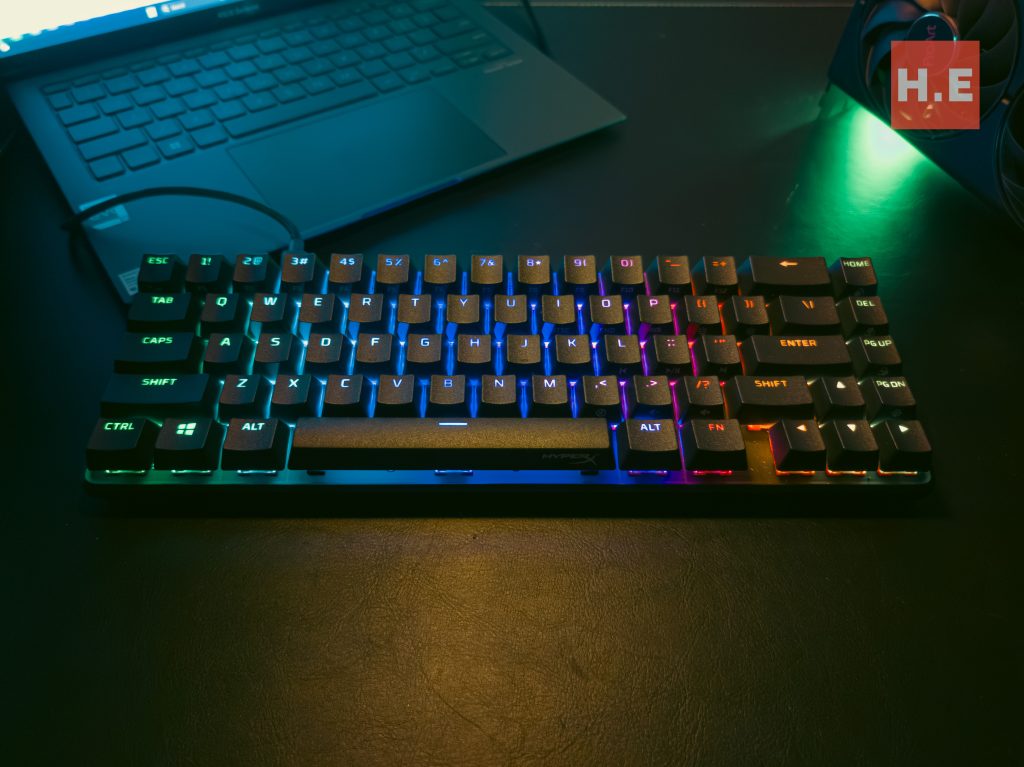
The HyperX Alloy Origins 65 is HyperX’s new entry in their mechanical keyboard lineup. A variant of the Origins series, it shares a similar layout with the other variants but has been reworked to be more compact. It generally looks like the smaller-sized Alloy Origins 60 but with essential keys such as the arrow keys and several keys from the control pad.
Body
The HyperX Alloy Origins 65 is perhaps one of the heaviest keyboards I have experienced, which also gives it much more stability than any keyboard I’ve used before. My previous experience with keyboards was that they were easily bumped and moved, but the HyperX Alloy Origins 65 is as stable as a rock. Of course, this also means that the keyboard is on the heavier side, weighing in at 0.8 kg. This keyboard is definitely the heaviest keyboard I’ve used.


The weight comes from the keyboard body, which is made of aircraft-grade aluminum. If I’m correct, the body is built with Aluminum alloy 2024, which exhibits high yield strength and excellent fatigue resistance. This means that the keyboard can take a lot of punishment, which is perfect for me since I have a habit of rage typing.

The keyboard provides good typing ergonomics, offering three levels of height adjustment: flat, 7 degrees, and 11 degrees. I’m used to having only one level of height adjustment, so having three levels now makes me feel like a king. 😄

Also, one of the features this keyboard has is a detachable USB Type-C port for connecting the keyboard to a PC. The USB Type-C cable is your run-of-the-mill USB Type-C cable, and while it looks relatively easy to replace, it’s actually not since the port on the keyboard body has limited fitting, allowing only USB Type-C cables with slimmer heads to fit in.
Keycaps
Stock Keycaps
The keycaps, to me, are the highlight of the HyperX Alloy Origins 65. The keycaps are what HyperX calls premium double-shot PBT keycaps. PBT plastic is known for being more durable and capable of enduring extreme temperatures. That ensures the keycaps stay in good condition for portable users and won’t melt if users use them in a furnace 😄.


In addition to the main function indications engraved on the keycaps, the keycaps are made with durable PBT material that is resistant to wear, friction, and solvents. Also HyperX also given a sets of cute red space themed key caps as optional customization.

The legends are clear, with the light from the RGB lighting passing through the cutouts. Secondary functions and media keys are printed on the sides of the keycaps for reference, with function keys embedded into the numeric keys on top.
PaperRex


Alongside the stock keycaps, HyperX also sent us PaperRex, a Singaporean esports organization’s merchandise keycaps. These keycaps come in three designs, starting with an embroidered W, a T-Rex head, and PaperRex’s logo. The keycaps are 3D printed, so they have some texture on their surface, and all of them come in Paper Rex colors. The stems are Standard cross/MX style stems.
Switches

Personally, I’ve been using a Cooler Master CK351 Gaming Keyboard with Cooler Master Optical Blue switches, so it took some getting used to the HyperX Red switches. The HyperX Red – Linear switch is a linear-style switch, where the operation is almost silent and has no feedback at all. The lack of tactile feedback is new to me, but the linear setup allows my fingers to experience the force of the spring pushing back as feedback.

The total travel distance is 3.8mm, slightly shorter than the Cherry MX Red switch. My daily typing consists mainly of 80% typing for reviews and 20% gaming, and with this switch, I do experience a better typing experience with great accuracy and satisfaction.
Software
The companion app, HyperX NGENUITY, allows users to extensively customize the keyboard. With NGENUITY, users can access up to nine RGB light profiles. In addition to the usual wave, pulsing, and other effects, one that really caught my eye is Screen Capture and Video Record, where the light basically either imitates a certain area of the display or the whole screen.
The software also allows users to customize keys, keyboard brightness, Game Mode profiles (disabling certain shortcut keys), present profiles for games and software, and, of course, updating the keyboard firmware.
HyperX Alloy Origins 65 Conclusion
I have a great time using the HyperX Alloy Origins 65, while the HyperX Red linear Switch is something that needed some time to get used to, it generally made my typing life significantly quieter. This helps me tremendously as I work in a retail environment where blue switch is overly obnoxious to type with.

Also having 3 level of height adjustment also helps with my typing too as I suffer from a certain degree of wrist pain from bad posture. And having an almost immovable keyboard really helps with a stable typing experience.

The keycaps on the keyboard are a standout feature too. Made of PBT material known for its durability and resistance to wear and the legends on the keycaps are clear and allow the RGB lighting to shine through.

Overall, the HyperX Alloy Origins 65 is a well-built and feature-rich mechanical keyboard that combines durability, stability, and customization options. Whether you are a casual typist or an avid gamer, this keyboard offers a satisfying typing experience and the ability to personalize your setup to match your style and preference.
Help Us!
So, there you have it, our review of the HyperX Alloy Origins 65. If you agree with our assessment and are considering purchasing one, please consider using the affiliate link below. The affiliate link doesn’t cost you anything extra, but it would greatly help us keep the lights on here at HelloExpress.